Car Jump AI Video Generator
Car Jump AI Video Generator: create an AI video from your photo. AI video: 10 credits. Open the AI generator to start, or try the free caption editor below.
Car Jump AI Trend AI generator
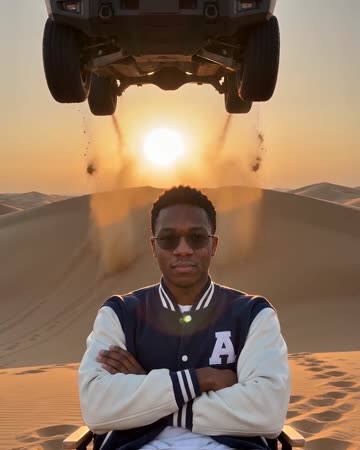
A video of you, or you and one other person, sitting calmly on a folding chair in desert dunes while a buggy flies over your heads
AI video: 10 credits
AI examples. Open the generator to add your own photo.
Caption it
Free, no sign-in. Made on your phone; nothing is uploaded.
This picture is an AI example, made with an AI-made person.
How to use the Car Jump AI Video Generator
Start with the moment you want the joke to capture. Try one of the available pictures, or choose a JPG, PNG or WebP from your device. Put the setup in the top line and the payoff in the bottom line. You can leave either line empty. Keep the text short enough to read on a phone; the preview updates while you type, so you can check that the words do not cover the part that makes the joke work.
What can this Car Jump AI Video Generator create?
The free Car Jump AI Video Generator exports a JPEG with your picture and captions. The text uses white lettering with a black outline, and a small site credit appears in the corner. It keeps the picture's proportions and reduces wide pictures to at most 1080 pixels across. It does not animate a still, extract a video frame or add a soundtrack. The separate AI generator uses the tested format described below. A video of you, or you and one other person, sitting calmly on a folding chair in desert dunes while a buggy flies over your heads One continuous slow-motion shot with a finger snap, a whoosh and a bass drop An original cinematic action beat Check the examples and output details before spending credits.
Give your Car Jump AI Trend version a clear punchline
Sit still, look bored, let a car fly over your head. Use that idea as the starting point for a situation your friends recognise. A specific detail from your day usually gives the caption more meaning than a generic reaction. Read the two lines together before downloading: the second should finish or reverse the first. Try one version with less text and compare it in the preview. You can change the wording repeatedly in the Car Jump AI Video Generator without using credits.
Save and share from the Car Jump AI Video Generator
Press Save image when the preview looks right. On a supported phone, Share opens the device's share sheet with the image attached; otherwise it downloads the file. Choose the destination yourself. The Car Jump AI Video Generator does not publish to your account or add your picture to a public feed. If you want music or a timed video edit, add those in the app where you post. The caption editor keeps your selected picture and typed text in this browser tab only; save the finished image before leaving or reloading.
How do I make Car Jump AI Trend?
- Photos
- 1 photo for just you; 2 with someone else, or 1 photo of you both
- Output
- Video: 12 seconds, vertical 9:16, 720p, a few minutes, 10 credits
- You choose
- Who's in it: Just you, You + a friend, and You + your partner
- Fixed
- The desert, the black dune buggy and the music
You get
- A video of you, or you and one other person, sitting calmly on a folding chair in desert dunes while a buggy flies over your heads
- One continuous slow-motion shot with a finger snap, a whoosh and a bass drop
- An original cinematic action beat
Not included
- A real car make, an SUV of your choice or a place you pick
- A real stunt: the whole clip is made by AI
Step by step
- Tap "Put me in it" at the bottom of this page.
- Pick who's in it.
- Upload your photo, or both photos. A clear, front-facing face works best.
- The price is on the button, and a new account that signs in with Google gets 10 credits free.
- Wait for it to finish. It is saved under Me, where you can download or share it. A render that fails is refunded.
Posting your version
- Start your car jump AI video from one clear, front-facing photo.
- Keep it vertical, 9:16, for Reels and Shorts, and show the car in the first few seconds.
- Keep the car jump AI caption deadpan. The car does the shouting.
Car Jump AI Video Generator: FAQ
Is the Car Jump AI Video Generator free?
The caption editor is free, including JPEG downloads and sharing, with no sign-in. AI video: 10 credits. AI generation is a separate option and uses credits; its button shows the cost before you submit.
Can I use my own picture in the Car Jump AI Video Generator?
Yes. Choose a JPG, PNG or WebP up to 15 MB. Use a picture you own or have permission to edit. It stays in your browser for caption editing; it is not uploaded to our servers.
Does this Car Jump AI Trend generator make videos?
The AI generator offers video for 10 credits. Read its output details below and choose that option in the generator. The free caption editor exports a still JPEG only.
How do I write captions in the Car Jump AI Video Generator?
Type into the top and bottom text fields. Each field accepts up to 90 characters; either may be left blank. The preview fits the text automatically. Short captions are easier to read on a phone and leave more of the picture visible.
Will my meme be published automatically?
No. Save downloads your image and Share opens your device options. You decide where to post it. Pictures and captions used in the free editor are not saved to your account, so download your result before closing the page.
Where can I read what Car Jump AI Trend means?
Use the linked meme explainer for the meaning, original post, dated history and sources. This maker page focuses on creating your own version, with the available tools and their output described above.